
TL;DR

Get workout gear delivered free with Prime
- Fast, free delivery on millions of items
- Prime Video, Amazon Music and more included
- Member-only deals all year
The traditional rule that building your own AI workstation is always cheaper no longer holds. In 2026, buying a prebuilt can often save time and reduce risk, especially with rising component costs and complex thermal management. Your choice depends on your priorities around speed, control, and support.
Imagine a machine powerful enough to handle your AI models, but the question is: do you build it yourself or buy ready-made? The answer used to be simple—building was always cheaper, buying was for convenience. But the landscape shifted in 2026.
Now, with skyrocketing component prices and complex thermal management, the choice isn’t just about money. It’s about speed, reliability, and control. This article compares the two options, helping you decide which fits your goals best.
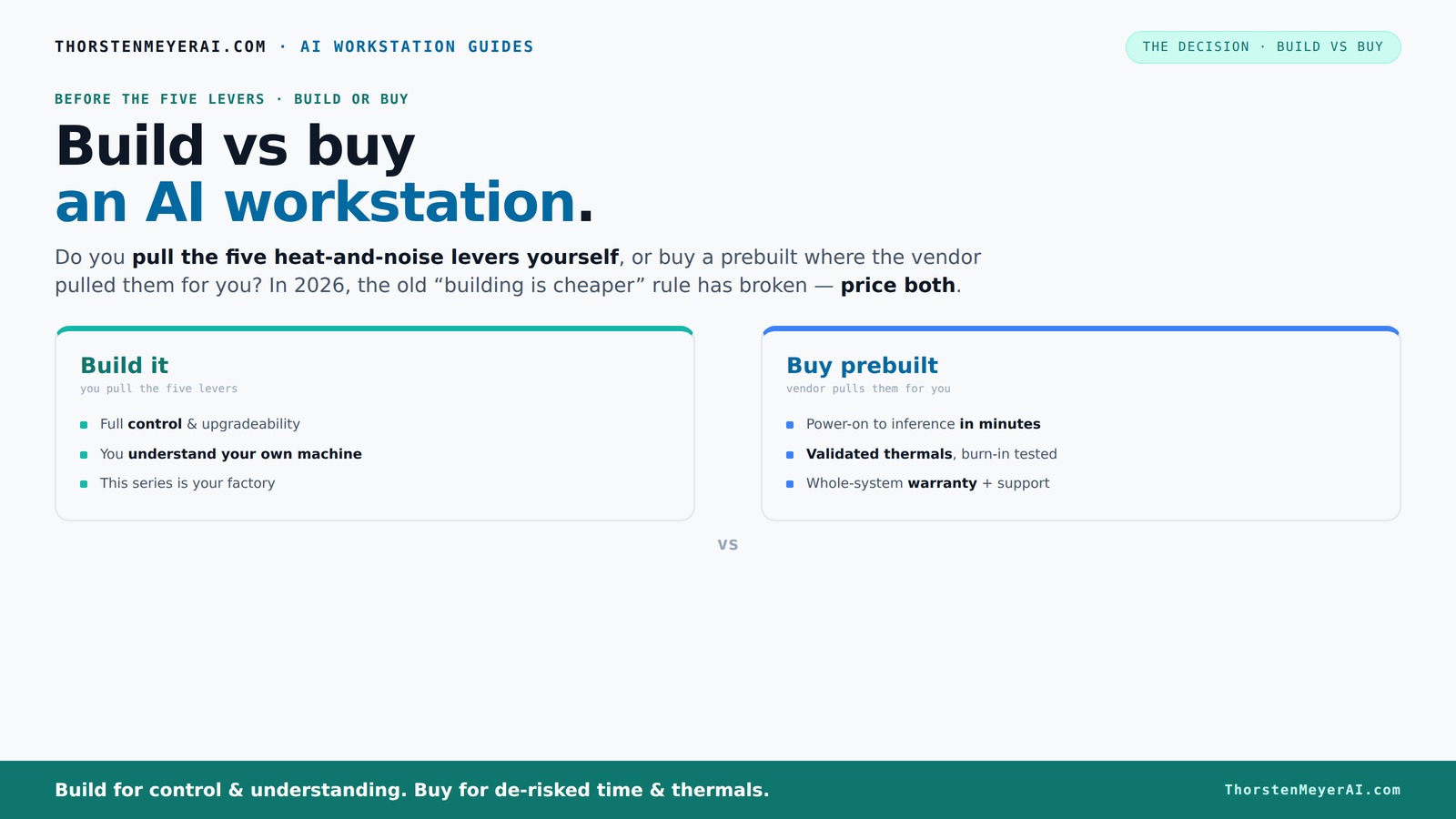
Build vs buy
an AI workstation.
The real question behind this whole series: do you pull the five heat-and-noise levers yourself, or buy a prebuilt where the vendor pulled them for you? And in 2026, the old “building is cheaper” rule has broken. Match your situation in Part 3.
Key Takeaways
- Component shortages and price spikes in 2026 make prebuilt workstations often as cost-effective as DIY builds, especially when factoring in support and validation.
- Thermal management is a major factor—vendors handle it with extensive testing, while DIY requires expertise and ongoing tuning.
- Speed to deployment favors prebuilt systems, which can be ready in days, while building from scratch can take weeks or longer.
- For complex workloads, multi-GPU setups, or long-term projects, building offers upgrade flexibility and control.
- A hybrid approach—buy the foundation, customize the software—is increasingly popular and balances risk with control.
As an affiliate, we earn on qualifying purchases.
Why 2026 Changes the Game: Building Isn’t Automatically Cheaper Anymore
In the past, building your own AI workstation was the clear money-saver. Today? Not so much. Rising prices for GPUs, DDR5 RAM, and SSDs have pushed the total cost of DIY rigs above prebuilt systems from major vendors.
For example, a DIY build with a high-end GPU, 128GB RAM, and fast SSD now easily costs over $2,000—sometimes more—while a prebuilt from a trusted vendor can come in at the same or even lower. According to HP’s analysis, bulk buying and validation make prebuilt systems competitive, especially during shortages.
Implication: The tradeoff here is that while DIY might seem more customizable, the rising costs and the need for extensive research, sourcing, and troubleshooting can diminish the financial advantage. For many, the hidden costs of time and effort outweigh the initial savings, making prebuilt systems a more pragmatic choice. Additionally, the economies of scale and vendor validation mean prebuilt systems often come with optimized thermal performance and stability — critical for AI workloads that push hardware to its limits.
As an affiliate, we earn on qualifying purchases.
The 5 Levers of Heat and Noise: Who Handles Them, You or the vendor?
Running a powerful AI workstation means managing heat, noise, and stability. The five levers are undervolting, cooling, airflow, fan tuning, and placement. Do you pull these yourself, or does the vendor?
Buy a prebuilt: the vendor takes care of all five, running extensive testing and fine-tuning to keep your machine cool and quiet. Companies like Lambda or BIZON validate thermals, often offering water-cooling for quieter operation.
Build it yourself: you get to choose your GPU, cooler, case, and fans. You tune everything manually—learning, fixing, and adjusting as needed. This gives you control but demands expertise and time. The tradeoff is that you can optimize thermal performance for your specific workload, potentially reducing noise and preventing overheating during intensive tasks. However, this requires a deep understanding of thermal dynamics and ongoing maintenance to sustain optimal conditions. Failing to manage these properly can lead to thermal throttling, reduced lifespan, or system instability, which can severely impact AI training and inference performance. this guide offers practical tips for DIY thermal management, but it underscores that the process is complex and time-consuming.
As an affiliate, we earn on qualifying purchases.
Speed vs. Customization: Which Gets You Up and Running Faster?
Speed is king. A prebuilt workstation can be ready to run in days, sometimes hours, with OS, drivers, and AI stacks pre-installed. Just unpack, plug in, and start training or inference.
Building from scratch can take weeks—sourcing parts, assembling, troubleshooting BIOS and drivers, and testing. For example, a researcher needing quick results might prefer buying. This immediate deployment is crucial when deadlines or project timelines are tight. Conversely, the DIY route allows for deep customization—tailoring components and configurations precisely to your workload, which can lead to better performance and efficiency in the long run. But this comes at the cost of time and potential troubleshooting delays. The tradeoff is that prebuilt systems, while faster to deploy, may not offer the exact hardware setup you desire, especially for specialized workloads requiring specific configurations or newer components not yet available in prebuilt options.
As an affiliate, we earn on qualifying purchases.
Performance Needs: When Does a Custom Build Make Sense?
If your AI workload demands multiple GPUs, massive VRAM, or specific hardware configurations, building can be worth it. You control power delivery, cooling, and expansion, ensuring your system handles heavy loads without throttling.
For example, a team training multi-GPU models might need custom water-cooling and PCIe expansion. Prebuilt systems are improving but often limit upgrade paths or multi-GPU configurations. This limitation can lead to bottlenecks or the need to replace the entire system sooner, increasing long-term costs and downtime. When performance demands exceed what prebuilt options can reliably support, a custom build allows you to optimize for your specific workload, extending the usable life of your hardware and ensuring stability during intensive tasks. this guide to quiet GPUs explores how tailored GPU choices can enhance performance while reducing noise, which is vital in high-performance AI environments.
Support, Warranty, and Reliability: Why they matter
Prebuilt vendors validate every system, run extensive stress tests, and offer warranties—sometimes up to 5 years. If something breaks during a critical training run, support is just a call away.
With a DIY build, you're on your own for troubleshooting, updates, and repairs. While you save money upfront, you risk downtime and unexpected costs. For example, Lambda’s support team helps troubleshoot thermal issues remotely, saving you hours of frustration. Over time, reliable support and warranty coverage can be the difference between a smooth project and costly delays. When working with complex AI models or critical infrastructure, the assurance of vendor support reduces risk, minimizes downtime, and provides peace of mind, especially if hardware failures occur unexpectedly. This reliability often justifies the higher initial investment, as it can prevent costly project delays and hardware replacements.
Upgradability and Future-Proofing: Building Flexibility Into Your System
Building your own machine often means easier upgrades—more slots, better power supplies, flexible cooling. You can swap in newer GPUs or add RAM as needed.
Prebuilt systems may restrict expansion or require shipping back for upgrades. If your project grows, DIY might save money and headaches in the long run. For example, choosing a case with multiple PCIe slots and a high-capacity power supply enables future GPU additions or memory upgrades without significant overhaul. This flexibility can extend the usable life of your workstation, especially as AI models evolve and demand more resources. However, prebuilt systems are increasingly offering modular designs that support upgrades, but often with limitations. The key is assessing your projected growth: if you anticipate significant hardware expansion, a DIY approach provides the most control and cost-effective path over time.
Hybrid Approaches: The Best of Both Worlds
In 2026, many teams buy a validated workstation and then customize the AI stack or add hardware upgrades. This hybrid approach balances support with control.
For example, you might purchase a prebuilt with excellent thermal validation, then fine-tune the software or add a second GPU yourself. This approach allows you to leverage reliable hardware while tailoring the software environment to your specific needs, reducing initial setup time and risk. It also enables incremental upgrades, which can be more cost-effective and less disruptive than a full rebuild. The hybrid model is especially appealing for organizations that need rapid deployment but also want some degree of customization and future flexibility. It’s a pragmatic compromise that combines the stability of prebuilt systems with the adaptability of DIY upgrades.
Frequently Asked Questions
Is a prebuilt AI workstation worth it?
Yes, especially if you value speed, support, and proven thermal performance. It reduces setup time and minimizes troubleshooting, making it ideal for urgent or business-critical projects.Is it cheaper to build or buy once you include hidden costs?
It depends. While building can be cheaper upfront, hidden costs like troubleshooting, support, and potential downtime can add up. In many cases, prebuilt systems offer better total cost of ownership, especially during shortages.How much faster is a prebuilt workstation to deploy?
Prebuilts can be operational within a day or two, while building your own might take several weeks—especially if sourcing parts or troubleshooting hardware issues.What kind of AI workloads justify a custom build?
Heavy multi-GPU training, VRAM-intensive models, or workloads requiring specific hardware configurations benefit from custom builds, which allow tailored cooling, power delivery, and upgrade paths.Can I upgrade a prebuilt workstation later?
Often yes, but it can be limited by the case, power supply, or motherboard design. Building your own machine generally offers easier and more flexible upgrade options in the long run.Conclusion
Choosing between building or buying your AI workstation isn’t just about cost anymore. It’s about how quickly you want to start, how much control you need, and how much risk you're willing to take. In 2026, the smart move often combines both: buy the sturdy foundation, then tailor it to your needs.
Think of it as assembling a custom sports car—start with a proven chassis, then add your personal touches. Your ideal AI rig is waiting, whether built, bought, or a mix of both. The key is to pick what matches your workload and your patience.
Fall Picks
fall essentials
As an affiliate, we earn on qualifying purchases.